I stopped carrying a portable travel keyboard, and my commute got instantly faster
Unless you strictly work at a stationary desk with a standalone tablet, skip the portable keyboard. Commute friction compounds fast. For transit-heavy professionals, a separate travel keyboard just adds dead weight, charging anxiety, and setup lag when you actually need to work.
Why I bought it (context + expectation)
It was 6:30 AM on a Tuesday, and I was weighing my commuter bag on a kitchen scale. Weight reduction is a measured priority for me—grams literally matter when you are walking between transit hubs. I was desperate to drop 2 kg off my shoulders by leaving my bulky work laptop at the office.
I bought into the popular concept of a minimalist tablet-plus-keyboard setup. The theory sounded airtight. Pack an ultra-light tablet, grab a 250g standalone folding Bluetooth keyboard, and suddenly you have a mobile office. I wanted the ergonomic feeling of real keys without the heavy carry load. Portable is not optional for me, so I purchased a highly-rated, pocket-sized folding keyboard, fully expecting it to transform my transit downtime.
How long I used it (timeline + frequency)
I ran this modular setup for three weeks across my Bay Area routes. At first, it was a tentative yes pending peak-hour tests. I used it on Caltrain stretches, in SoMa coffee shops, and during quick layovers.
My commute is a system—failure points are predictable. I quickly realized that pulling out two separate devices, turning the keyboard on, and waiting 8 to 12 seconds for the Bluetooth handshake was destroying my workflow. My mornings are won or lost in small delays. By week two, I found myself dreading the assembly process. I was tracking the battery life of a secondary peripheral, which ate into my strict 45-minute weekly maintenance tolerance for repacking and cable checks.
Is it worth it (real gain)
No. I treat failure points as reliability tests, and standalone travel keyboards fail the core test of transit: instant readiness.
I optimize for worst-case Tuesday, not best-case Friday. A worst-case Tuesday means I have a narrow 12-minute window to draft a status report while jammed into a crowded train seat. If I bring my laptop, the keyboard is already attached. If I bring a tablet, an integrated folio case snaps open instantly. A standalone Bluetooth keyboard requires a flat surface, deliberate placement, and pairing time. I value reliability over extra modes, and adding another discrete item to my carry load simply wasn't worth the theoretical space savings.
Pitfalls (hidden costs + friction)
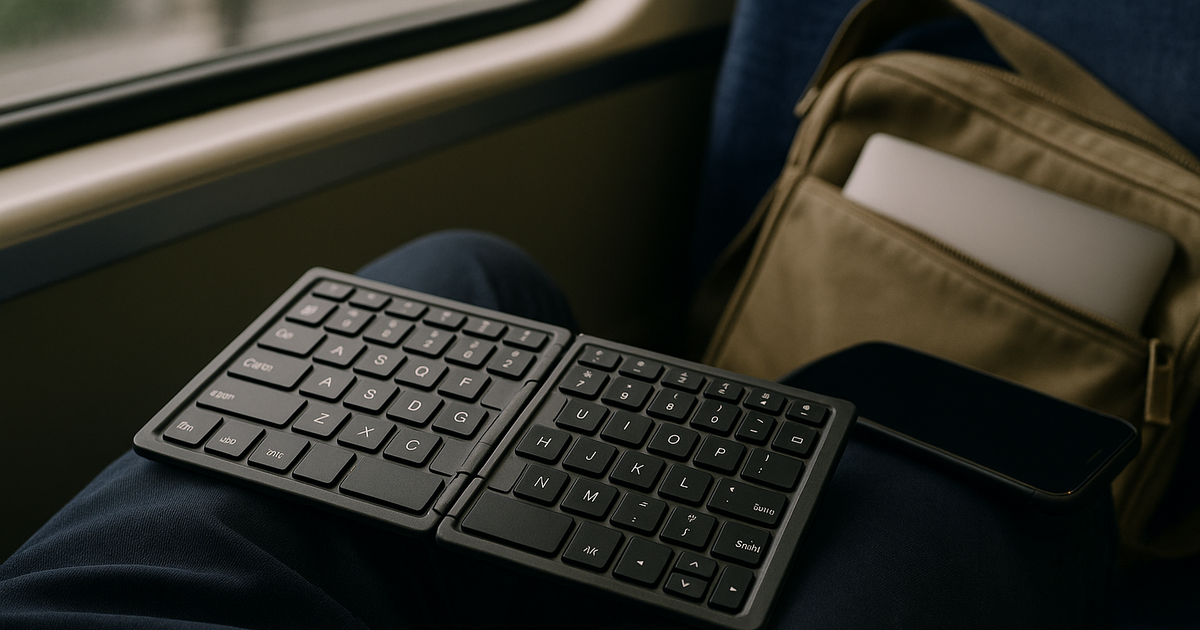
Between train changes at Diridon Station, I had exactly a 15-minute gap. I tried to balance my tablet and a standalone folding keyboard on my lap to fire off a quick email. The train gave a slight jolt, the folding hinges collapsed inward, and the keyboard slid straight off my knees onto the floor.
If setup takes too long, it fails in real life. That lap-typing disaster highlighted the critical flaws of the travel keyboard category:
* Zero lap stability: Folding keyboards require a rigid, flat table. If you are typing on your knees during transit, the hinges will flex and bend under your hands.
* Ergonomic penalties: Miniaturized keys drop your typing speed. In a high-stakes job where downtime cost is high, losing 20% of your WPM to cramped finger placement is a massive liability. Occasional neck tension is bad enough without hunching over a detached tiny board.
* Charging friction: Many older travel keyboards still use micro-USB. I run a strict USB-C-first mobile office. Carrying a legacy cable just for a keyboard breaks my packing rules.
Long-term changes (30/90/180 days)
I completely abandoned the dream of the multi-piece modular mobile office. I moved back to a strict, integrated-device rule.
7:12 AM train. Boarding. Sit down, open screen, type immediately. That is my current reality. I either carry my primary laptop when heavy computing is required, or I use a tablet with a built-in keyboard folio case. Dropping that extra 250g of unnecessary plastic and battery cells made my bag simpler. I no longer worry about Bluetooth lag or dead peripherals.
Who this is not for (clear boundary)
On cross-city commute days, your gear needs to be invisible to your workflow. If it cannot survive peak-hour chaos, I move on.
Do not buy a standalone portable keyboard if you rely on lap typing. Skip this entirely if your transfer times are short and you need instant-on capability. It is also a poor choice for anyone trying to minimize their mental load regarding battery management. If you only have ten minutes to work, you shouldn't spend two of them setting up your desk.
Alternatives (safer options)
Instead of buying a flimsy folding keyboard, look at integrated or full-sized alternatives:
* Tablet Folio Cases: If you want tablet portability, buy the manufacturer's integrated keyboard case (like the Magic Keyboard or Surface Pro Type Cover). It provides instant connection, structural rigidity for your lap, and zero extra charging cables.
* Low-Profile Mechanicals: If you truly need a separate keyboard for extended hotel room work (not transit), buy a dedicated 75% low-profile mechanical keyboard. It will weigh around 500g but will actually give you desktop-level typing speed and reliability.
One-line verdict (would I buy again?)
If it slows my route, I drop it—skip the standalone portable keyboard and stick to integrated laptops or folio setups for true commute reliability.
Related navigation: Priya persona channel, digital-productivity cluster, commute-and-business-travel scenario.