I dropped 2 kg of dead weight from my daily carry with a strict two-device commute system.
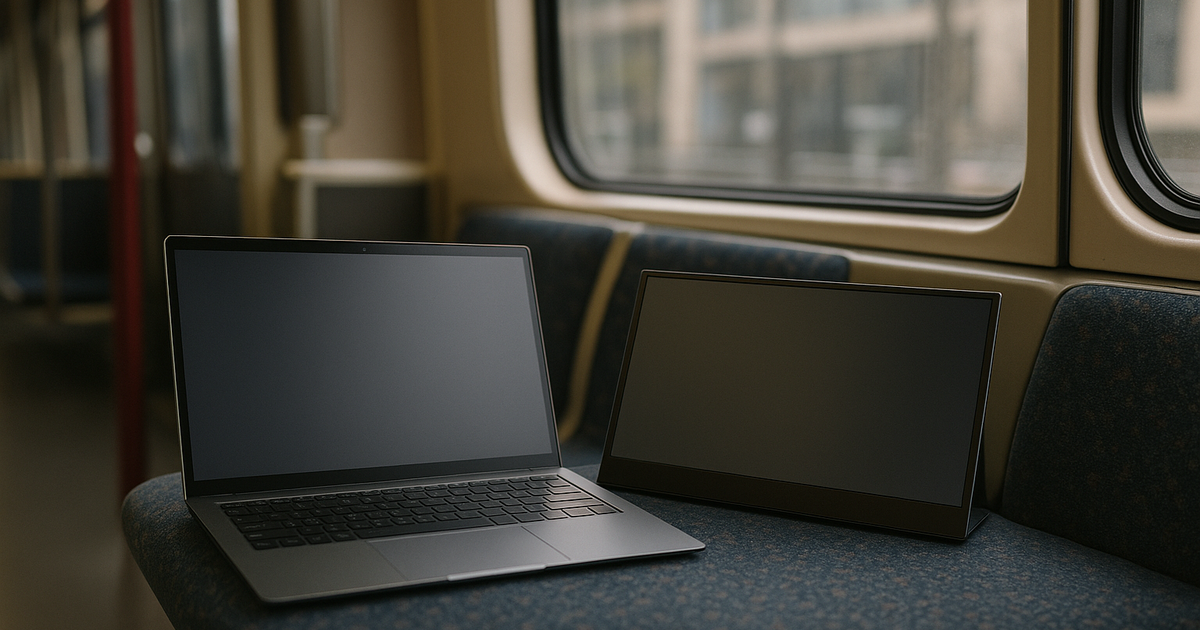
If your **weekly cross-city commute** involves sprinting between transit platforms, carrying a heavy tech setup is a tactical error. I cut my carry load down to just two core devices: the 2.2-pound ASUS Zenbook A14 and a portable monitor. Portable is not optional for me.
Why I bought it (context + expectation)
In Bay Area cross-city commuting, waiting at Diridon Station during a five-minute transfer window will expose every flaw in your gear. Last quarter, hauling a heavy 15-inch laptop, a secondary tablet, and a massive charging brick onto Caltrain left my shoulders aching. Commute friction compounds fast. Weight reduction is a measured priority for me—grams literally matter when you are navigating turnstiles and stairs. I needed a ruthless two-device limit.
I optimize for worst-case Tuesday, not best-case Friday. That meant finding a primary machine that did not require me to carry a wall charger at all. The ASUS Zenbook A14 became the foundation of this system because it weighs less than 2.2 pounds but pushes a massive 24-hour battery life. Deleting the power brick alone cut significant bulk.
How long I used it (timeline + frequency)
Between train changes, I evaluate my setup's speed. I have been running the Zenbook A14 alongside the Dell Pro 14 Plus Portable Monitor for about nine weeks. My high-stakes job means downtime cost is high. I cannot afford dead batteries or screens that take ten minutes to calibrate on a client site.
The Zenbook’s Arm-based Snapdragon processor handles my spreadsheets and Slack huddles without stuttering. Tentative yes pending peak-hour tests, but so far, the Ceraluminum shell has survived the daily jostle inside my backpack without a single dent. Still validating under delay-heavy weeks, but the physical hardware holds up brilliantly.
Is it worth it (real gain)
My mornings are won or lost in small delays. Having an excellent 14-inch OLED display that I can just flip open and use instantly is a massive advantage. The 24-hour battery endurance isn't just marketing text; it actively allowed me to permanently remove my tangled charging cables from my bag.
Paired with the Dell portable monitor, I get a dual-screen mobile office that sets up in under thirty seconds. I value reliability over extra modes. It strictly works, it stays out of my way, and it keeps my carry load incredibly light.
Pitfalls (hidden costs + friction)
Setting up my dual screen at a cramped hot desk in San Francisco last week highlighted a few friction points. Fumbling with a monitor stand on a narrow table is frustrating. The Dell Pro 14 Plus features a simple foldable stand that works beautifully on a wide desk, but if you are on a tiny train tray table, the deep footprint is a problem.
Second, the monitor has absolutely no HDMI port. It only houses two USB-C ports. Since I run a strict USB-C-first mobile office, I prefer this, but legacy port users will be stuck carrying dongles. Finally, if you rely on noise-canceling headphones to create a mobile office environment, manage your expectations. ANC perfectly handles the steady low-register hum of the train engine, but it cannot block out the pure physical vibration of wheels going over tracks.
Long-term changes (30/90/180 days)
If setup takes too long, it fails in real life. Transitioning to this strictly two-device system physically changed how I travel. I dropped nearly 2 kg of dead weight by eliminating my old backup tablet, bulky power adapters, and heavily padded sleeves.
My backpack is visibly slimmer, and my transit transfers are significantly faster because I am not fighting gravity. I treat failure points as reliability tests. So far, this minimal configuration passes every metric.
Who this is not for (clear boundary)
If you rely heavily on HDMI cables or proprietary chargers, this specific loadout will frustrate you. It is also not for anyone who needs to do heavy video rendering on x86 architecture, as the Zenbook runs on an Arm-based processor that limits certain legacy apps.
If it cannot survive peak-hour chaos without requiring extra adapters, I move on. This setup demands fully committing to modern USB-C standards.
Alternatives (safer options)
If you cannot mentally let go of backup power, the Anker 737 Power Bank (PowerCore 24K) is a highly reliable alternative to hunting for wall outlets. It can charge an iPhone 13 up to 5 times or a 12.9-inch iPad Pro 1.3 times. However, it is heavy and actively works against extreme weight cutting.
For audio isolation during the commute, the Bose QuietComfort Ultra Headphones block out general noise exceptionally well. Just remember that you must maintain them; dirt or wear on the ear pads will compromise the noise cancellation integrity quickly. If it slows my route, I drop it.
One-line verdict (would I buy again?)
This two-device setup deletes heavy chargers and messy cables; if it survives commute reality, I keep it.
Related navigation: Priya persona channel, mobility-commute cluster, commute-and-business-travel scenario.